Wattvia
How it works Pricing PECO rates Contact Sign in Sign up

Sign up

Sign up for Wattvia.

Already have a Wattvia account? Sign in.

Four quick steps: create your account, then bring your data your way.

Your plan Connected 30 days free · then $49 per year founding
Administrator test sign-up

This creates an isolated test participant and portal view. It does not replace your Wattvia login, and participant email and text delivery remain blocked.

Leave this off for the standard stubbed test. Turning it on may create a real Bayou customer and requires a fresh confirmation.
Wattvia customer-zero onboarding

This is a one-time production Connected onboarding for an authorized operator. It creates a new WATT account, connects live PECO data, and can move the existing portal login from the withdrawn pilot identity. It does not send a participant message or delete the legacy portal.

Current rate plan is locked to Time-of-use for this canary. The trial starts only after Wattvia receives the first usable interval dataset.
Coming soon

Wattvia Basic is coming soon.

One-time assessment and Connected sign-ups are available today.

Choose One-time assessment Choose Connected
Sign-up is closed right now. Please email support@wattvia.com if you need help.

Your PECO service location

Enter the ZIP code for your PECO service address so Wattvia can confirm availability and tailor your rate-plan question.

Wattvia is built for PECO customers in greater Philadelphia today. Email support@wattvia.com if you want us to notify you when Wattvia reaches your utility.

Appliances

Optional. These questions help us interpret your usage patterns. Select all electrical appliances in your home.

Select all that apply

Your Wattvia profile

We use these details to create your account and connect your read-only utility data.

Use at least 12 characters with uppercase, lowercase, and a number.

Terms · Privacy Policy · Text Message Terms

Account open

Checkout

Basic scores every week of every month you upload. Cancel anytime from your account page; your assessment and history stay yours.

Wattvia Basicannual billing$29 / year
Continue to secure checkout Coming soon

Checkout is hosted by Stripe. Card details never touch Wattvia. After payment you will land on your first upload.

Account open

Connect your PECO data

Bayou.Energy is Wattvia's secure utility-data connection partner. It asks for the same PECO login you use at peco.com.
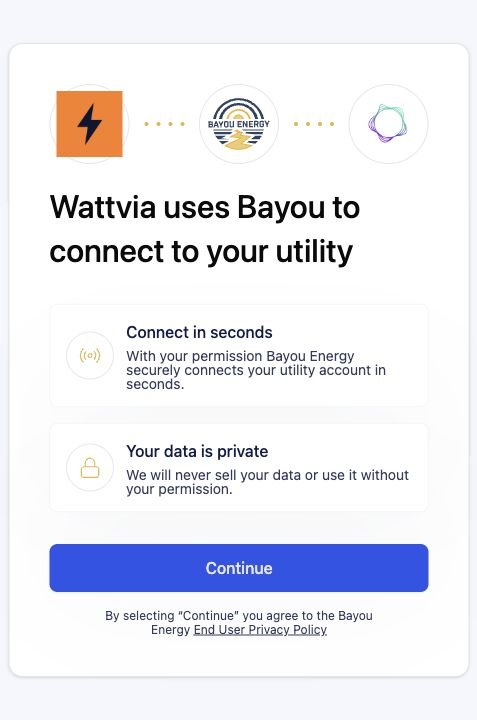
1 Confirm WattviaSelect Continue after you see Wattvia on the Bayou Energy screen.
Bayou Energy welcome screen showing the Wattvia mark and Bayou Energy logo
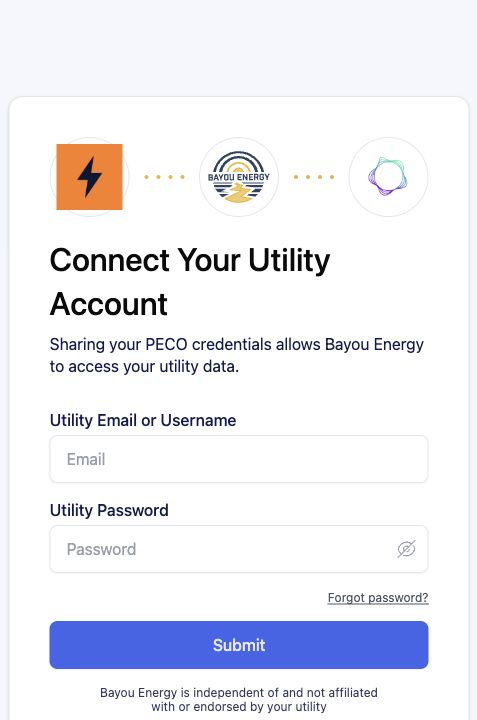
2 Connect PECOEnter the same PECO username and password you use at peco.com, then complete PECO's multi-factor authentication (MFA).
Bayou Energy PECO connection screen asking for utility credentials

Wattvia never sees or stores your PECO password. It goes only to Bayou.Energy, which encrypts and stores it securely.

Wattvia receives read-only data - your PECO usage and billing history, nothing else.

Review Bayou.Energy's security practices →
Waiting for Bayou.Energy authorization confirmation
  1. Confirm Wattvia.
  2. Enter PECO credentials.
  3. Complete MFA.
  4. Confirm success, close the Bayou tab, and return here.
New tab didn't open? Continue to Bayou.Energy →

What happens next

  1. You do not need to submit the sign-up form again.
  2. Wattvia will follow up if a new secure authorization link is needed.
Your free 30-day trial starts when Wattvia receives the first usable interval data. Continue to Bayou.Energy Continue to your account

Opens in a new tab. This page updates automatically after authorization.

Wattvia

Educational usage-timing feedback for residential electricity customers.

Sign in Pricing PECO rates Terms Privacy Policy Contact

Wattvia is operated by Energy Insights LLC. Copyright 2026 Energy Insights LLC. Not affiliated with, sponsored by, or endorsed by any utility company.